A separate studio on its own domain, with its own credits — not a bot feature and not tied to a server.
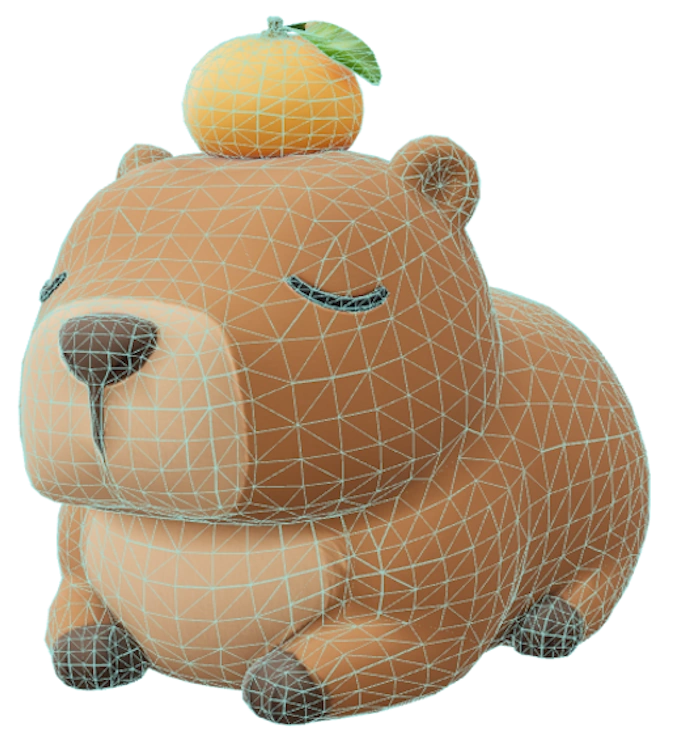
Reference imageGenerated mesh
ENCRYPTED & SECURE
Your data is protected — even if stolen.
All sensitive credentials are encrypted before being written to our database. Even a full database breach would expose nothing usable.
what our database actually sees
your tokenmfa.k8Qw…Zr2x
stored asgAAAAB…
01
AES-256 · FERNET
Encryption at rest
Discord and Roblox OAuth tokens are encrypted with AES-256 (Fernet) before being stored. The raw tokens never touch the database — only their ciphertext does.
02
OPAQUE SESSIONS
Your browser holds no secrets
Your browser only stores an opaque session reference — a random token. Even if someone reads your local storage or cookies, they cannot recover your Discord or Roblox credentials.
03
SERVER-SIDE KEY
Stolen tokens are useless
Encrypted tokens can only be decrypted with a server-side key that never leaves our infrastructure. A stolen ciphertext without that key is cryptographically unbreakable.
04
FULL-DISK ENCRYPTION
Everything on an encrypted drive
The entire database lives on a fully encrypted drive. Even with physical access to the hardware, the data at rest is unreadable without the disk key.
REALTIME
Watch bot performance in realtime.
Gateway latency, uptime, and shard health are public. See exactly how the bot is doing — any time, no login needed.
Scan your Roblox catalog — your own UGC items and items owned by groups you run.
Get prices, favorites, sale status, and export to CSV.
🔒To use this feature, first authorize at least one Roblox account.
UGC Scanner
Server scan queue: 0Sales parse queue: 0
FREE0 scans
·0 parses
PAID0 scans
·0 parses
details›
Scan balance
Free
Scans0Parsing0
Paid
Scans0Parsing0
Scan my UGC
Click a card to pick a target. Click multiple for bulk scan.
👥
No groups loaded yet
Click Load groups to fetch the Roblox groups you own. Your own catalog card is always shown above.
Scan in progress…
Connecting to Roblox…
0items
Existing Scans
Generate a CSV from data you've already scanned. Each link is valid for 1 hour.
To add sales data: upload the monthly Sales CSV files generated by Roblox (in the sales page).
Sales Analytics
Metrics from your uploaded monthly Sales CSVs. Pick a target & year, toggle panels, click a legend slice to filter it out.
Roblox Trackers
Track live Roblox stats and post them to your server on a schedule. Each tracker is its own card — expand the one you want.
Game Player Count (CCU)
Post live concurrent-player counts for your games
0 / 1
Paste a game's place ID above — we fetch its name automatically.
Require Roblox Authorization
Automatically verify members are linked to a Roblox account.
How it works: Members authorize their Roblox account on the dashboard and
enable this server — the bot assigns the configured role (and optionally updates their
Discord nickname to their Roblox username) the moment they click Save, no
command needed. They can also run /verify in your server as a fallback; if they
haven’t linked yet, the bot sends them a private link to the authorization page.
Moderators can use /verify-username to check whether a member is verified with
Roblox and see their linked Roblox username.
Send message on join (Premium) lets the bot post a verification-prompt
message to a channel of your choice every time a member joins, so new users are told
exactly how to verify without anyone having to DM them.
Require Roblox Authorization
Gate roles and nicknames behind Roblox verification
Role to assign on verification
Nickname sync
Change Discord nickname to Roblox username
Append Roblox username to Discord username
⚠ The bot’s role must be positioned above the member’s highest role in Server Settings → Roles, otherwise Discord will block nickname changes.
Send message on join
Post a verification prompt when a member joins
Assign role on join
Remove role upon Roblox verification
Welcome / Bye
Configure welcome and goodbye messages for new members.
Welcome / Goodbye Messages Sent automatically when a member joins or leaves.
Use {user} to mention them, {user_name} for their username as plain text,
{server} for the server name, {member_count} for current member count.
Welcome Message
Triggered when a member joins
Assign Roles on Join
Assign role(s) when member joins
Goodbye Message
Triggered when a member leaves
Embed Builder
Build and send custom Discord embeds to any channel.
Fill from Preset
Schedule Send
Scheduled Messages
Messages queued for future delivery
Image Only Channels
Restrict selected channels so only messages containing an image attachment are allowed. Everything else is deleted automatically.
Image Only Channels deletes any message posted in the selected channels that does not include a static image attachment (.png, .jpg, .jpeg, .webp). Each channel has its own Bypass, Allowed, and Blacklisted role lists configured independently. In Discord use /image-only-channels set to mark a channel image-only (with an optional single role) and /image-only-channels status to review the current configuration — configure multiple roles per channel here on the dashboard. Higher tiers unlock more channels.
Image Only Channels
Per-channel image-only enforcement
Channels per tier
Configured Channels
0 / 1
Each configured channel is shown below with its own bypass, allowed and blacklisted role lists. The channel configured under Competition (if its image-only option is on) doesn't count toward your cap.
No image-only channels configured yet. Add one below to get started.
Add Channel
Pick a channel to start enforcing image-only posting in it. After it's added you can configure its bypass / allowed / blacklisted roles above.
Quick Threads
Pre-configured private-thread messages moderators can fire with a single slash command.
Quick Threads gives moderators a /create_thread slash command that creates (or reuses) a private thread for a chosen user, optionally seeded with one of the message templates you configure below.
Configure up to 10 templates. Pick a template when running /create_thread and the bot posts its contents into the new thread after a greeting. Running the command again for the same user lands in the same thread (unarchived if needed) instead of creating duplicates — so this works equally well for first-time outreach and for re-opening past conversations.
ⓘ Template names are fixed by Discord. The /create_thread command shows them as Template 1 through Template 10 — Discord does not allow renaming slash-command choices once the command is registered. Remember which slot you put each template in (e.g. "Slot 3 = Best-voter reward"), since the label your mods see in Discord will always be the slot number.
Quick Threads
Private-thread templates for /create_thread
Templates per tier
Message Templates
Click any template slot to expand and edit. Empty slots are hidden from /create_thread at runtime.
Delete User Messages
Scan all channels and bulk-delete recent messages from a specific user.
Delete User Messages Requires Premium tier.
Configure default scan limits and role restrictions, then run a cleanup job from the website or via
/user_clean_messages in Discord.
Delete User Messages
Role restrictions and cleanup controls for this command
Target User ID
Retrieve Count
Delete Count
Allowed Roles
Blacklisted Roles
Message on Mute
Send a message to a muted user when a moderator applies the mute role.
Message on Mute Sends a configurable embed message whenever a moderator manually assigns the mute role to a user. This is triggered by a role assignment — not by any automated detection — so it fires only when your moderation team explicitly mutes someone.
Mute Message Settings
Message sent when a user is muted
Auto Mute
Automatically mute users and send a message when they ping @everyone or @here.
Auto Mute Automatically mutes users who ping @everyone or @here — a hallmark of spam bots — and sends a configurable embed message to the preset channel. This works even when @everyone and @here mentions are disabled for regular users. Note: legitimate users can trigger this accidentally, so if usage of @everyone or @here is allowed on your server — this feature should be disabled.
Auto Mute Settings
Message, channel and behaviour
Timeout on Spam
Auto-timeout repeat offenders
Enable Timeout on Spam
Automatically times out the user if they continue spamming after being muted. Triggers on repeated @everyone / @here pings.
Hugging Users
Let server members hug each other with a bot command.
Hugging Users — Use !hug @mention or !hug @mention #channel to hug someone. The #channel is optional — if provided the response is sent there instead of the current channel.
Command Settings
Message, behaviour and cooldown
Delete original message
Command cooldown
Adds a delay between uses to prevent spam. When disabled, commands can be used without any wait.
min 5 · max 60
Cooldown type
Command Logging
Allowed Roles
Blacklisted Roles
Slapping Users
Let server members slap each other with a bot command.
Slapping Users — Use !slap @mention or !slap @mention #channel to slap someone. The #channel is optional — if provided the response is sent there instead of the current channel.
Command Settings
Message, behaviour and cooldown
Delete original message
Command cooldown
Adds a delay between uses to prevent spam. When disabled, commands can be used without any wait.
min 5 · max 60
Cooldown type
Command Logging
Allowed Roles
Blacklisted Roles
Funny Image Commands
Create custom slash commands that post images from your categories.
Funny Image Commands These simulate Roblox-style chat commands — they are not actual slash commands. The bot watches the chat and detects when a user types the exact command text (e.g. /e dance), then triggers the corresponding image.
Commands
Configure each command
Commands per tier
Command cooldown
Adds a delay between uses to prevent spam. When disabled, commands can be used without any wait.
min 5 · max 60
Cooldown type
Allowed Roles
Blacklisted Roles
Codes Drop Portals
Drop a magic portal in a random channel — a random eligible member wins a UGC item code, delivered in a private thread.
Codes Drop Portals Paste your item codes, pick the channels portals can drop in, then press Start Campaign. The bot posts a clickable portal in a random channel; the first member activates it and others join within a short window, then a random eligible member wins one code. It keeps dropping at random intervals until every code is claimed. Use /codes_drop_portals_control in Discord to check or stop a running campaign.
Campaign & Codes
Live status, the channels in use, and used vs remaining codes
Idle
Campaign —
Started —
Next drop —
Codes —
Drop channels: —
Winner threads: —
Public drops log: —
Staff mod log: —
No active campaign. Configure the cards below and press Start Campaign.
Recent Campaigns
Last 6 kept
No campaign loaded yet.
Fill from Preset
Portal & Codes
The codes to give away and where portals can drop
Drop Channels *
One item per line: Item name: code1, code2, code3. Each code max 40 characters. Codes are loaded when you press Start Campaign.
0 items · 0 codes
Random code selection
Portal Embed
Every portal state — message, image and footer — is editable in the tabs below. Footer lines are yours: delete a line and it isn't shown.
Required Role (optional)
Codes per member
Timing
How long the portal waits and how often it drops
Join window (seconds)
Move portal after (seconds)
Drop interval (minutes)
to
No-winner retry (minutes)
to
"Checking entries" pause (seconds)
"Finding cheaters" pause (seconds)
"Selecting winner" pause (seconds)
Winner Thread
The private thread where the winner gets their code
Thread Channel
Auto-archive
Also invite (user IDs)
Logging
Optional public + staff drop logs
Public drops log channel (no codes shown)
Show next-drop time in public log
Staff mod-log channel (verbose; includes codes)
Competition
Run image-based competitions where members vote on entries with reactions.
Competition Members submit images in the competition channel. Others react with the configured emoji to vote. When time ends, the bot announces winners automatically — or a moderator picks from the top entries. Use /competition_control in Discord to stop a running competition or check its status.
Available placeholders: {title}, {winner}, {votes}, {prize}, {channel}, {hours}, {ends_at}.
Competition Running
Channel: — ·
Started: — ·
Ends: — ·
Entries: —
Load Preset
Fill competition settings from a saved preset
Competition Settings
Core settings for the competition feature
0 / 256
0 / 256
One prize per winner, matched by place — the 1st-place prize goes to the top winner. Rows follow the Number of Winners field below. Use {winner_prizes} in the Winner Announcement to list every winner with their prize automatically.
Competition Channel *
End Date & Time *
Vote Reaction Emoji *
Number of Winners *
Winner Selection Mode
Tiebreak Mode
Poll Duration
hours
Tie-Break Ping Roles (optional)
Moderator Ping Role (optional)
Allowed Moderators (optional)
Pre-End Reminder & Status Updates
Send a reminder before the competition ends and post periodic standings
Enable Pre-End Reminder
Post a one-off reminder shortly before voting closes.
Minutes Before End *(120 = 2 hours)
Reminder Channel (optional)
Enable Status Updates
Post the live standings on a repeating interval while the competition runs.
Interval (minutes) *(120 = every 2 hours)
Updates Channel (optional)
Winner Announcement
Customize the embed posted when a winner is announced
Announcement Channel (optional)
Add Role to Winner (optional)
Other Settings
Channel options, access control, and premium features
Allowed Participant Roles (optional)
Banned Roles
Image Only During Competition
Bypass Code (optional)
$
Lock channel on End
Lock Bypass Roles (optional)
Minimum Server Age Gate
Minimum Days in Server
days
Votes Log
Votes Log Channel
Random Voter Selection
Prize text shown to the selected random voter. Appears below the main competition prize line in the random-voter announcement. Leave empty to skip.
0 / 256
Create private thread for the winner
The private thread will be created in this channel. The server owner is added automatically. Make sure this channel's permissions allow the selected users to view it and send messages — threads inherit permissions from the parent channel.
Extra staff who should have access to distribute prizes. Paste a user ID (or <@id>) and press Enter. The server owner is always added, so no need to list them here.
Private thread for random voter
The private thread will be created in this channel. The server owner is added automatically. Make sure this channel's permissions allow the selected users to view it and send messages — threads inherit permissions from the parent channel.
Extra staff who should have access to distribute prizes. Paste a user ID (or <@id>) and press Enter. The server owner is always added, so no need to list them here.
Save as Preset
Store the current settings as a named preset to reuse later
Guess Word Game
Run a quick "guess the word" giveaway — first correct answer wins.
Guess Word Running
Channel: — ·
Host: — ·
Started: —
Question: — ·
Prize: —
Start Game Settings
Two message templates in the tabs below: Start from Dashboard is what the Start Game button posts (write your question directly in it); Start from Discord is what /guess_word posts (the command's options fill its variables). Both persist as the server's defaults.
Posted when you press Start Game below. Write your question (and anything else) directly into the message — the prefilled question is just an example.
Enable /guess_word command
0 / 256
Game Host (optional)
Allowed Roles (participation)
Blacklisted Roles
Create Private Thread for Winner
How it works: when someone wins, the bot opens a private thread under the Thread Channel (or the game channel if none is picked) and posts the message below. The winner, the game host, the server owner and everyone in Extra Users are added automatically. {prize_name} and {winner_code} in the message are filled from the Prize and Win Code fields — or from /guess_word prize: code:, which replace them for that run. The Win Code is never shown publicly — only inside the thread.
Thread Channel (optional)
Prize (optional){prize_name}
Win Code (optional){winner_code}
Extra Users to Invite
Counting Game
Members count up in a dedicated channel. The bot watches and enforces the rules.
Counting Game Pick a channel, configure the rules, and enable the game. Members post integers in sequence. The bot handles the rest — no slash command needed.
Counting Game Running
Channel: — ·
Current: — ·
Next expected: — ·
Last user: —
Counting Game Settings
Enable the game, pick a channel, and tune the rules. Pressing Start Counting Game saves the settings and starts the game.
Celebrate Milestones
Allowed Roles (participation)
Blacklisted Roles
Premium Plans
Manage your subscription and unlock premium features.
Free
Upgrade to unlock premium features for your server.